


🎧 Prefer Audio?
Here’s a human-recorded audio version with Chief Voice Officer Kirk McDavitt. Hit play, or keep reading below.
Where We Are
A parent has a concern about their child’s behavior in class.
They email the homeroom teacher, the division head, and the school counselor. All three.
It seems harmless. They’re just covering their bases…
But think about what you just created: three professionals now need to coordinate who’s handling this, avoid duplicating responses, and figure out if this is a discipline issue (division head), a developmental concern (counselor), a classroom management situation (teacher), or something requiring all three.
That coordination work is the invisible cognitive load you’ve just distributed across three people’s already-full plates.
The Triage Tax
If you’ve been following along with this series, you know we’ve been exploring how invisible organizational structure creates friction everywhere.
Here’s something that is quietly draining your teachers’ energy every single day:
Parents don’t know who handles what type of issue.
So they email everyone. Or worse, they email the person who’s most accessible—usually the classroom teacher—regardless of whether that teacher has the expertise (and sometimes the authority) to address the concern.
Now your teachers stop what they’re doing to triage emails that have nothing to do with their actual job. They forward them to the right people, context gets lost in translation, and response times balloon because nobody realized this needed urgent attention until it had already passed through three inboxes.
The Concept: Service Blueprinting
This week, we’re fixing that using a tool from service design called Service Blueprinting.
While Journey Mapping (which we covered a few weeks ago) tracks what the parent feels, a Service Blueprint tracks how your school operates to deliver that experience. The Nielsen Norman Group has a solid 3-minute breakdown of the full methodology if you want to go deeper.
But here’s what matters for your school right now:
A Service Blueprint is divided by a critical boundary called the Line of Visibility.
Frontstage (Above the Line): What the parent sees—the email they send, the reply they get.
Backstage (Below the Line): What your staff does—the forwarding, the debating “whose job is this?”, the coordination chaos.
Here is the reality of the Triage Tax: The parent sees a simple “Frontstage” action—they sent one email. But “Backstage,” your staff is engaged in a messy, tangled web of coordination to figure out who should answer.
Because the parent cannot see the Backstage effort, they don’t value it.
They only feel the delay, which is inevitably part of this experience.
The Fix
We’re going to redesign your service blueprint so the frontstage action routes correctly from the start—eliminating the backstage chaos entirely.
How? We (re)create your “Who to Contact” directory and make it actually visible.
This directory changes the service blueprint. Instead of the email landing in a teacher’s inbox (requiring backstage triage), the directory routes the parent to the correct expert before they hit send.
A Three-Step Plan to Reclaim That Capacity
Step 1: Map the Spaghetti (Do This Now)
Before you can direct parents, you need to see what’s actually happening.
Map the mess: Take one recent complex email—something like “My child is struggling in math and seems anxious.”
Write down every person who touched it:
Teacher → Department Chair → Counselor → Learning Support Coordinator → back to Teacher for final response.
Count the handoffs. That’s your spaghetti diagram.
Define the straight lines: Rapid-fire list your top 5-7 issue categories and assign one clear owner for each:
Academic/Curriculum: Teacher/Department Chair
Learning Support: Learning Support Coordinator
Social-Emotional: Counselor
Operations: Operations Manager (Bus, Lunch, Facilities)
Health: Nurse
Billing/Enrollment: Business Office
Step 2: The Quick Win
Translate those “straight lines” into a clear, one-page directory for parents, such as this:
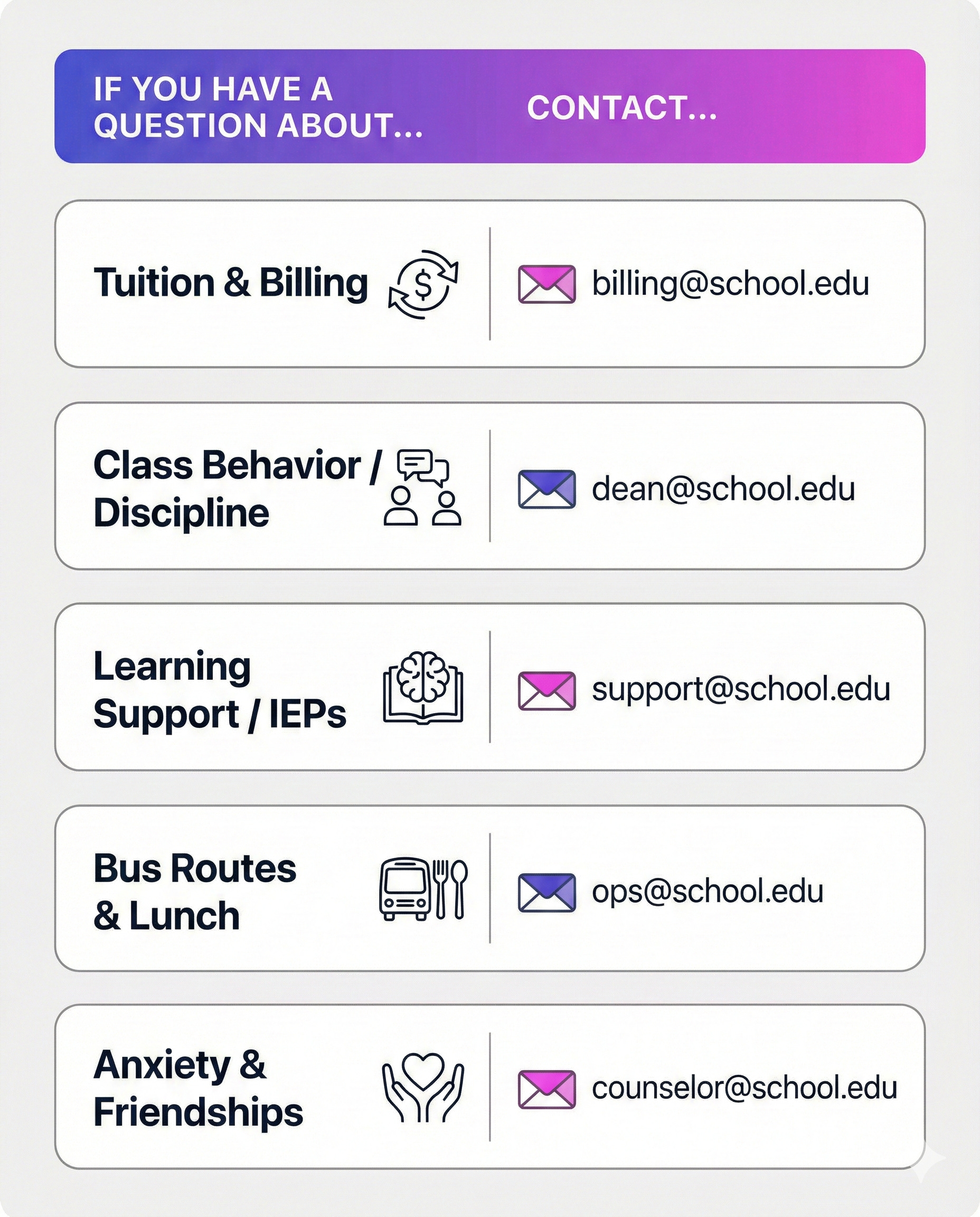
Publish it where parents will actually see it
Do not bury this in a handbook nobody reads. Put it here:
Parent portal homepage — First thing they see when they log in
Website navigation bar — “Quick Answers” or “Who to Contact”
New family welcome packet — Literally page 2
Back-to-school orientation slides — Normalize using it from day one
And here’s the key move:
Train your teachers to redirect using the directory.
When a teacher gets an email about billing, their response becomes:
“Thanks for reaching out! For billing questions, our Business Office can help you faster than I can. You can reach them directly at billing@school.edu, or find all contacts in our [Issue Directory].”
That’s not dismissive; that’s protecting their cognitive capacity while serving the parent better.
What if parents push back?
Some will. They’ll say “I just wanted to ask you quickly.”
Your response:
“I totally understand! And [Name] in [Department] can answer this way faster and more accurately than I can. I want to make sure you get the right info.”
You’re not dismissing them. You’re serving them better.
Step 3: The System Fix (Your Long Game)
The ultimate move? Partner with IT to add a “Who should I contact?” widget to your portal. Before a parent can send a message, they answer: What is this about? The system then routes the message to the correct person automatically.
Reality check: This might take 4 weeks. It might take 4 months depending on your IT capacity and competing priorities. That’s fine. The directory (Step 2) solves 80% of the problem immediately. This just makes it foolproof.
Don’t have a portal? Use a shared Google Form. Parent fills it out → form auto-routes to correct person based on their selection. Same outcome, different tool.
Note: You likely won’t need custom code for this. Most school portals and form builders have “conditional logic” already built in.
Why This Works
Time Recovery: Every email that goes directly to the right person instead of bouncing through three inboxes saves 15-30 minutes of staff coordination time.
Faster Resolution: Parent concerns resolve 48-72 hours faster when they reach the right person first, avoiding the translation lag and context loss.
Reduced Burnout: Teachers don’t burn out from teaching. They burn out from being the universal “Service Desk” for every category of concern. This gives them permission to protect their attention.
Straight lines beat spaghetti paths.
Need a Structured Way to Work Through This?
Last week I introduced The Clarity Sprint—a self-paced workshop based on the Design for Clarity series. If you missed it, here’s the 90-second overview:
Pick your team type (Senior Admin, Comms, or Middle Leaders & Teachers), gather your group, and walk through a systematic process to audit and redesign one critical piece of your school’s communication—like the directory we just discussed.
Coming soon. I’m finalizing details now.
Format: Self-paced, video-guided workshop
Investment: $67—your support helps me keep practice by design free while creating resources like this.
Get notified when it launches ⤵️
What’s Coming Next in the Beyond the Org Chart series
Next week: The Teacher Who Stopped Asking for Help. Because if parents can’t navigate your systems, imagine what your own staff experience when they need to request supplies, book a room, or get IT support. The invisible structure problem doesn’t stop at the school gates; it’s happening internally too.
This Week’s Move
Pick ONE issue category that currently travels through a “Spaghetti” path at your school. Blueprint the mess. Then, write one clear “Who to Contact” entry and publish it in your next newsletter.
See the difference straight lines make.
Systematically yours,

About the Author:
G (short for Gitane) is co-founder and Chief Creative Officer at EKG Collective, helping international schools turn communication complexity into systematic clarity. Learn more at ekgcollective.com.
I think it would also work as a great magnet, literally a fridge magnet...I also wonder about clarifying better for parents about giving their child a little opportunity to work on that friendship issue for themselves. I'm imagining a spectrum that matches their emotion to the emotion of the parent to a time to wait and process before escalating.