


🎧 Prefer Audio?
Here’s a human-recorded audio version with Chief Voice Officer Kirk McDavitt. Hit play, or keep reading below.
Where We Are
Last week, we met the teacher who paid $73 for science supplies because the “official” path was too exhausting to find.
If you did a journey map after that post, you likely saw the same thing: your staff isn’t “failing to follow the process.”
They are simply choosing the path of least resistance.
The problem isn’t a lack of guidance…usually, there’s too much of it (hello, onboarding packet!).
The problem is a lack of navigation.
Toronto Fixed Its Underground Maze. Your School Can Too.
I’m writing this from Canada, and the timing for this particular post couldn’t be more fitting.
This week, I'm in Toronto for the AAIE Global Leadership Conversation, working and learning with these two (and a few other brilliant minds).

The conference brought over 500 participants into a single hotel with more than 1,000 rooms. Think about that for a second. Five hundred people navigating dozens of session halls, breakout spaces, registration desks, meeting rooms… all under one roof.
And yet, somehow, nobody gets lost. Not really. Not for long.
Because the hotel’s way-finding system, combined with the conference’s own signage, does the heavy lifting. The environment speaks. You don’t have to ask. You just… move.
The PATH
The real lesson, however, comes from walking into Toronto’s PATH system, the world’s largest underground pedestrian network. This thirty-kilometer tunnel system connects over 75 buildings, serving more than 200,000 commuters every single business day.
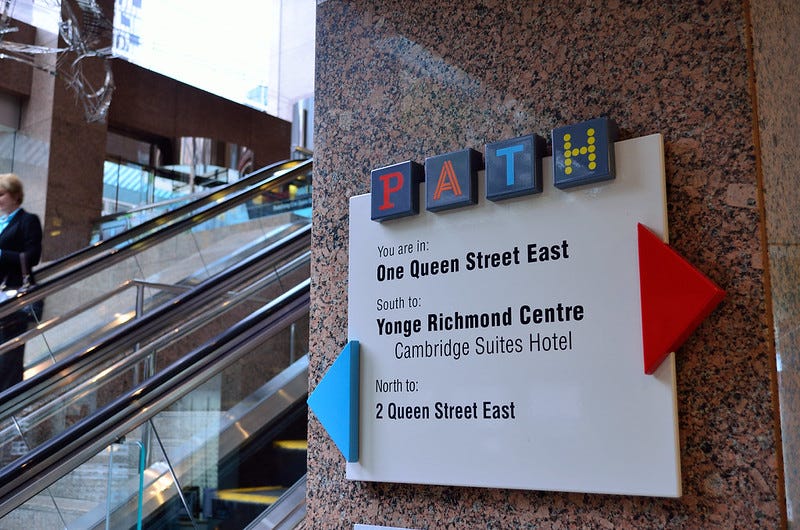
For decades, the PATH was notoriously confusing. The tunnels were built piecemeal over fifty years by different developers, each with their own signage. A sprawling underground city where even daily commuters could get turned around.
Then, in 2024, the city completed a comprehensive way-finding overhaul. They scrapped the old compass-based color system, which, it turns out, nobody actually understood, and replaced it with something far simpler.
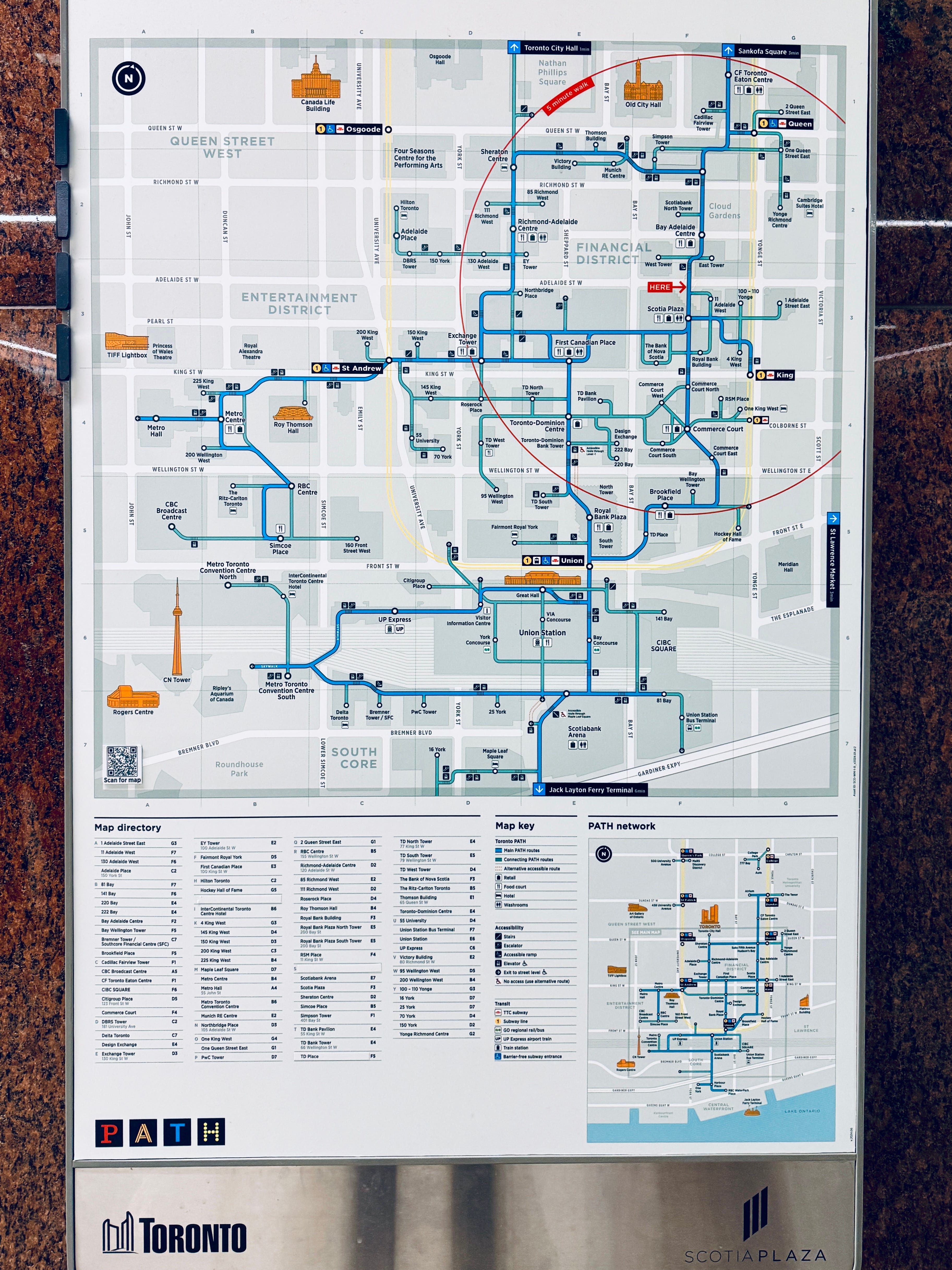
The system doesn’t ask you to memorize a code. It shows you where things actually are.
On my one free day exploring the city (in crisp -17ºC weather!), I paused there, underground, watching dozens of commuters navigate without hesitation, and I thought: This is exactly what we need in our schools.
Not new systems or bigger manuals. A better map.
When a system is intuitive, it isn’t just efficient; it’s a message that says, “I’ve been expecting you, and I value your time.”
The Turnaround: From Scavenger Hunt to Support
I once worked at an international school where the staff was “system-fatigued.” Every administrative task felt like a test they hadn’t studied for.
We didn’t buy a new platform or hire a new assistant to solve this. Instead, my team and I sat down with our audit and rebuilt the process around five human-centered questions (truth be told, leading this effort ourselves taught us that the best solutions are often the simplest):
Where is the Front Door? We placed one permanent, unmoving “Quick Links” page in the staff portal. One click. Always there.
Is the Form “Low-Floor”? We stripped purchase and professional learning request forms down to the absolute essentials. No jargon, just: What do you need? When do you need it?
Does the Data Know Where to Go? We automated the handoff. The form routed itself based on the manager selected—no manual forwarding, no “Who do I send this to?”
Is the System Pulsing? We eliminated “the void” with an automated confirmation: “We have your request. Expect a status update by [DATE].”
What is the Promise? We published clear guidelines that explicitly outlined the next steps.
Six months later, out-of-pocket spending and reimbursement requests—which are always a nightmare to process—had nearly vanished. Even better, the nature of the communication shifted. Emails regarding professional development changed entirely; instead of “How do I do this?” they became meaningful requests for conversations with divisional leaders about professional growth. Because the new system automatically kept teachers informed, the Purchasing Manager saw a 60% drop in “status check” emails.
The friction hadn’t just moved; it had dissolved.
The Anatomy of a Pathmap
When you rebuild a process with intention, you are telling your staff: Your time is too valuable to spend it hunting for a PDF.
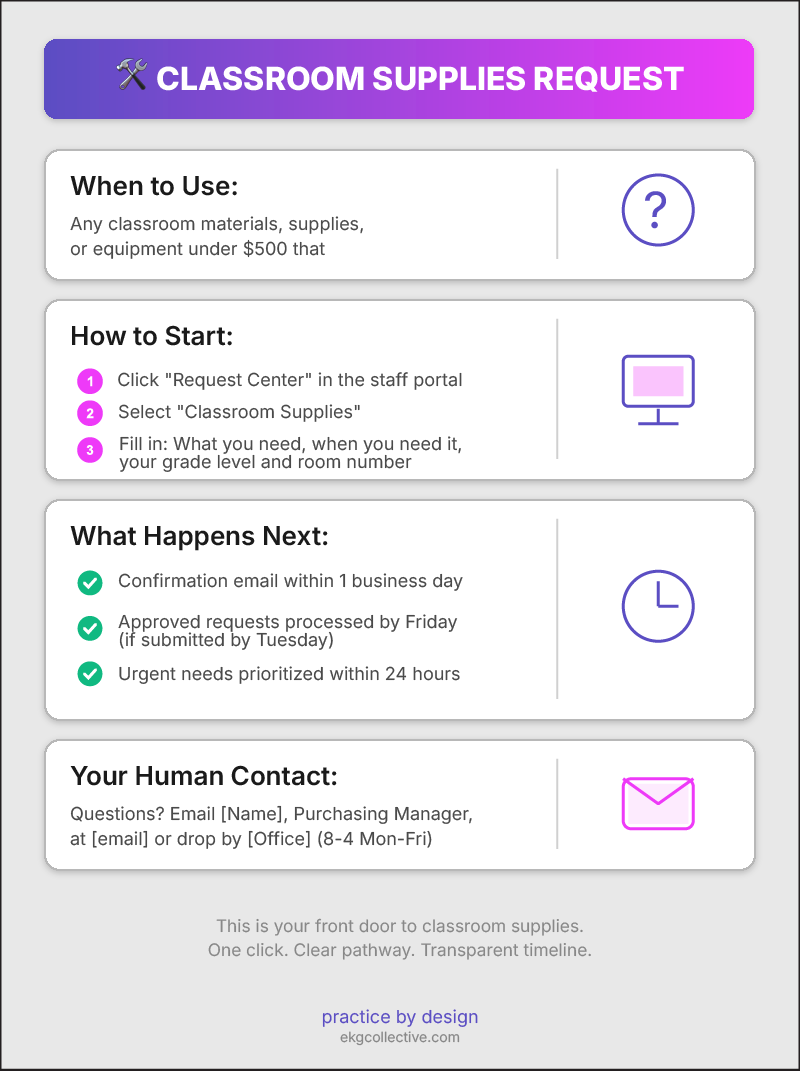
Every process in your school needs a pathmap. Not a policy manual, but a simple, one-page guide that answers the four questions every “lost” teacher has:
When do I use this? (e.g., “Any classroom purchase under $500.”)
How do I start? (The direct link to the “Front Door.”)
What happens next? (The “Promise” or timeline.)
Who is my human contact if the system breaks?
Here’s an example I built for you:
Your Tools for the Rebuild
I’ve built the Teacher Wayfinding Toolkit to help you do the “thinking work” of this redesign. Inside, you’ll find the Process Builder, which prompts you through these questions to help you design a path that actually fits your school’s culture.
How to use it:
Click the button above to download the HTML file to your computer
Locate the downloaded file in your Downloads folder (it’s called teacher-wayfinding-toolkit.html)
Double-click the file to open it in your web browser
The interactive toolkit will guide you through 5 questions to build your pathmap
What you’ll create:
By the end of the process builder, you’ll have a complete, downloadable pathmap that you can:
Customize with your branding (My recommendation! Choose the text file to do so)
Share with your staff (as is - HTML file)
Post in your staff portal
Print and display in workrooms
Note: This is a standalone HTML file that works completely offline. No login required, no data sent anywhere—it runs entirely in your browser.
What’s Coming Next in the Beyond the Org Chart series
Next week: How Parents Navigate Your Systems. We've focused on teachers for the past two weeks. Now we're flipping the lens to families. Parents face the same navigation challenges, but with higher stakes and less institutional knowledge. I'll show you how to build family-facing pathmaps that reduce "black box" frustration and create confidence in your school's responsiveness.
This Week’s Move
Build One Bridge
Pick the one process you audited last week, the one where you feel like your teachers are currently “paying the tax.”
Use the Process Builder in the Teacher Wayfinding Toolkit to define its new “Front Door” and its “Promise.” Write your one-page Pathmap using the four-question structure:
When do I use this?
How do I start?
What happens next?
Who is my human contact?
Publish it where people can actually see it: staff portal homepage, pinned in your communications channel, printed and posted in the workroom.
Don’t overthink it. Version 1.0 is better than a perfect plan you never execute.
The city of Toronto didn’t fix its underground city by writing a better manual. It fixed it by making the next step obvious at every single junction.
Your school can do the same thing, and it starts with one process and one pathmap.
Because when a teacher doesn’t have to spend their Sunday night wondering how to request a sub or book a room, they spend it resting. And a rested teacher is a teacher who stays.
Systematically yours,

About the Author:
G (short for Gitane) is co-founder and Chief Creative Officer at EKG Collective, helping international schools turn communication complexity into systematic clarity. Learn more at ekgcollective.com.
I love this analogy!